Show Posts

This section allows you to view all posts made by this member. Note that you can only see posts made in areas you currently have access to.


Messages - No.1

Pages: 1 ... 1189 1190 [1191] 1192 1193 ... 1374
17851
Warplane Art / Re: Speed road to Photoshop
« on: November 27, 2008, 11:06:54 AM »
How to direct load selection of the layer- simply hold Ctrl and left click on the layer thumbnail. In this way you can load selection of any layer into the any layer.

 :-wch

17852
Warplane Art / Re: Speed road to Photoshop
« on: November 27, 2008, 11:05:08 AM »
But how to temporary unlink layer- hold Schift and left click on Link Icon in layer...

 :-wch

17853
Warplane Art / Re: Speed road to Photoshop
« on: November 27, 2008, 11:03:39 AM »
It is sometimes important to link layers and when you move it or transform it all actions are apply on all linked layers. To link it hold Ctrl and left click on each layer field. Then click on the anchor icon at the bottom of the layer palette. If you want to unlink it just click again this icon.

 :-wch

17854
Warplane Art / Re: Speed road to Photoshop
« on: November 27, 2008, 11:00:22 AM »
Fats flatten of layers is easy - right click on any layer and choose Flatten Images from menu...

 :-wch

17855
Warplane Art / Re: Speed road to Photoshop
« on: November 27, 2008, 10:58:42 AM »
Here you are how to move layer effect from one layer to another- click Alt and just drag the little round flash like icon from the active layer to the layer you want it on, and it relocates to that layer. Also you can drag it in the trash if you don't need it.

17856
Warplane Art / Re: Speed road to Photoshop
« on: November 27, 2008, 10:56:00 AM »
How to change the opacity when is Free Transform active on a layer of the layer you're transforming?. But it's not just Opacity—you can change the blend mode as well. If you do photo restoration, or wind up having to take a head shot from one photo and composite it on another, you know what a time saver this will be.

17857
Warplane Art / Re: Speed road to Photoshop
« on: November 27, 2008, 10:51:24 AM »
How about a new layer that contains a flattened version of your whole layered document, without flattening your layers. One layer that looks like your flattened document. Now, it's just one simple keyboard shortcut, and it even creates the layer for you Ctrl-Alt-Shift-E.

 :-wch

17858
Warplane Art / Re: Heinkel He112
« on: November 27, 2008, 08:39:32 AM »
And where to get Heller kit?

Cheers ;)

17859
Warplane Art / Re: Heinkel He112
« on: November 27, 2008, 01:10:32 AM »
This is something :)

17860
Warplane Art / Re: Heinkel He112
« on: November 27, 2008, 12:05:54 AM »
Really? I did not know for this. Any list of the available kits?

17861
Warplane Art / Re: Henschel Hs129
« on: November 27, 2008, 12:05:06 AM »
Similar comment I get from my UK boss :)

17862
Combat Warplanes / Re: Aircraft photos
« on: November 26, 2008, 06:43:06 PM »

17863
Warplane Art / Re: Hawker Hunter
« on: November 26, 2008, 04:23:28 PM »
Details....

17864
Warplane Art / Re: Hawker Hunter
« on: November 26, 2008, 11:29:47 AM »
Approaching to final layout  :-tri

17865
Aircraft Modeling / Re: Late war Bf109
« on: November 25, 2008, 08:28:39 PM »
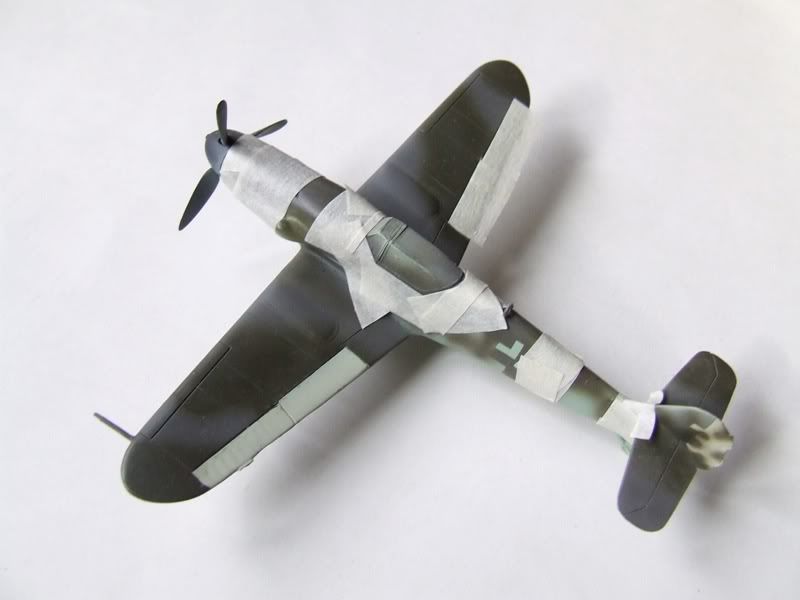
Thank you for your kind words ;) Now on this image is show the protection for the spinner, canopy frame and rear fuselage band. One more thing which will be repainted will be camouflage fields on the top of the starboard wing as well I did not match precisely shape and position of the camouflage colors.

http://i424.photobucket.com/albums/pp327/recenzije/Late%20Bf109/DSCF8693.jpg


Reference publication Aero Journal

Pages: 1 ... 1189 1190 [1191] 1192 1193 ... 1374